
Table of Contents
Hyperoptic routers require you to forward specific ports to communicate with external devices or game servers. From client servers to online games and P2P applications, you have to allow access to your network to receive incoming requests. But, some ISPs perform CGNAT, which can cause complications when you are trying to forward ports on these routers. Here is a detailed guide to help you get around CGNAT and open ports behind a Hyperoptic router.
What is CGNAT?
CGNAT (Carrier-grade NAT) is a technique that conserves the depleting IPv4 pool. This address translation mechanism introduces a new layer of IPs to the conventional method of translating IPv4 addresses. With CGNAT in place, most ISPs allot the same public IP address to different consumers relying on the same internet network.
Why does Hyperoptic perform CGNAT?
Without CGNAT, ISPs must continuously invest money to get more usable IPv4 addresses because the depleting IP pool enhances the cost. With CGNAT, ISPs can reduce the number of allocated IP addresses by assigning the same public IP to different customers on the same network.
Opening ports behind CGNAT is risky, even if your Hyperoptic router is configured for port forwarding. You can get your IP blacklisted if you try to port forward on a shared IP address, primarily when your ISP performs CGNAT. However, using a port forwarding add-on can help you with this problem.
How can PureVPN help you port forward Hyperoptic
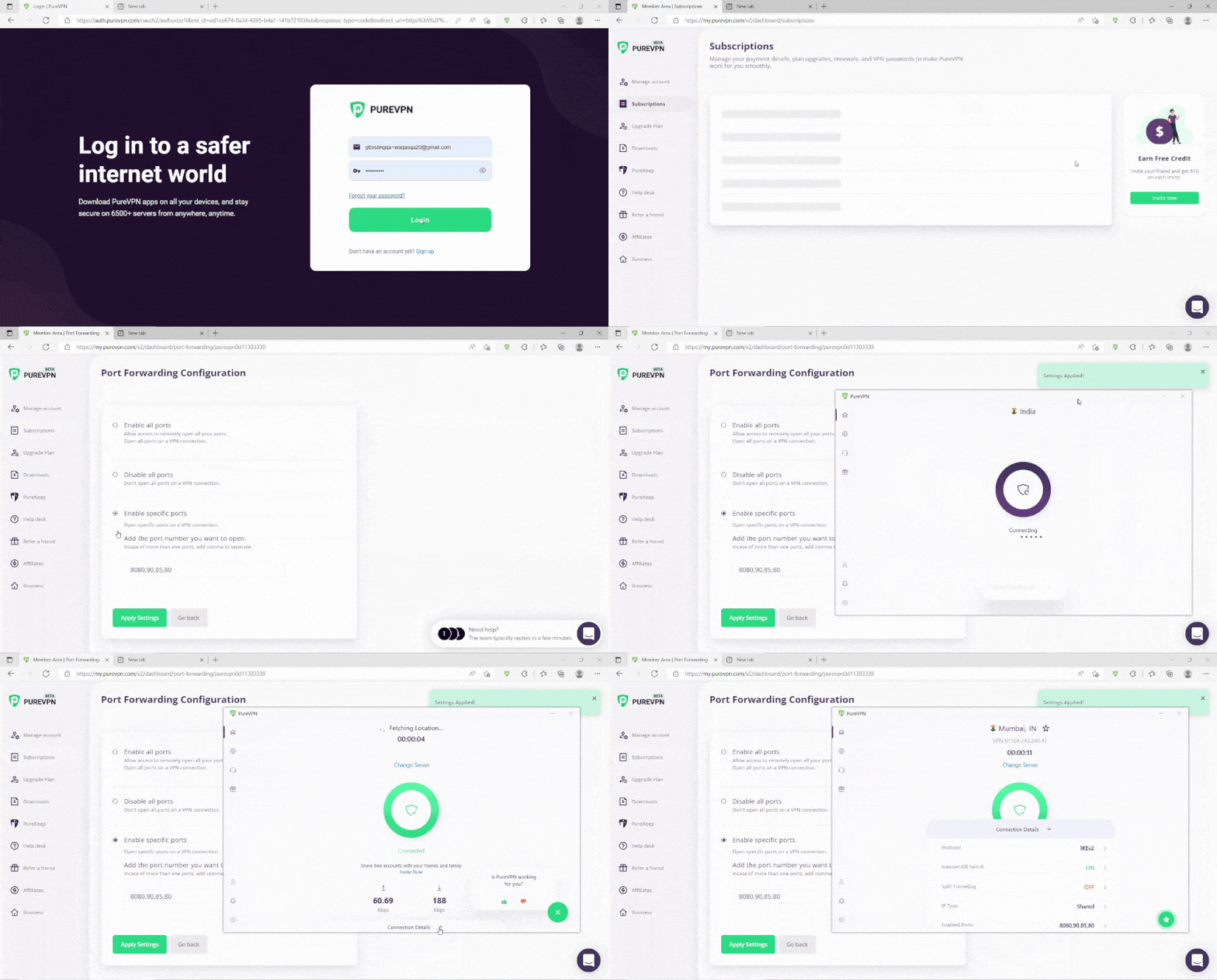
Using PureVPN’s port forwarding add-on is an effective way to get around CGNAT and automatically open blocked ports. If you want to skip the hassle of manually opening ports or buying a dedicated IP, use our port forwarding add-on today. Here’s how you can easily use our add-on and open ports:
- Login to the PureVPN member area.
- Click the subscription tab.
- Click Configure.
- Apply your desired port settings.
- Click Apply settings.
Quickly open ports using PureVPN
Port forward various routers even if you are behind CGNAT.

Host a server with a dedicated IP and port forwarding add-on
A dedicated IP address can allow external devices to connect to your server without any IP natting issues. Not only this, but a dedicated IP can also help in hosting game servers and websites, getting your IP whitelisted, and connecting to remote desktop applications. So, if you want to set up a gaming server or ensure secure remote access, you need to avail this dedicated IP and the port forwarding combo deal.
Why pick PureVPN to bypass CGNAT
PureVPN can provide effective solutions for all your port forwarding needs. From a dedicated IP address to port forwarding, DDoS attack add-ons, and so much more, PureVPN helps enhance your internet experience and keep your data safe.
Here’s what you can get with a PureVPN subscription:
- Access to more than 6,500 servers in 78+ locations
- Protection against malicious threats and DDoS attacks
- Excellent features such as split tunneling, IP masking, simultaneous logins

Ovais Khan

June 20, 2023

3 years ago


