
Apex Legends is a free battle royale game developed by Respawn Entertainment, most famous for the video game series, Titanfall. Apex Legends follows the same theme as Titanfall.
The game was released on February 4, 2019 and is available for Microsoft Windows, PlayStation 4, and Xbox One. Just after a week after its release, the game had over 25 million downloads and over 2 million active players.
What is Port Forwarding?
Many carriers in the United States keep some ports blocked and it varies from city to city and state to state. This may also occur in different countries as well, while being faced with these blocked port issues you will need to look at our detailed article on What is Port Forwarding? This may help you gain a better understanding of how ports work and what you can do to unblock those ports in order to play the games you want.
What is Port Forwarding & How does Port Forwarding Work?
How to Port Forward Apex Legends
To play the game, you need to forward some ports in your router as routers are not configured to Apex Legends game’s requirements. When it comes to gaming, forwarding ports is a helpful trick as it can bolster your network connection, making it more stable and faster.
Before You Forward a Port
Before you can begin the process of forwarding a port you need to know a few things:
- The IP address of your network router
- Your gaming device’s IP address
- A list of TCP and UDP ports that need to be forwarded
How to find your router’s IP Address
Here are the easiest ways to find your router’s IP address on Windows, PS4 and Xbox One:
How to find the router IP address on Windows PC
When it comes to Windows PC, there are two very simple methods for finding the IP address:
- Click Start, type CMD in the search box, and then select Command Prompt
- When a new window opens, type ipconfig and hit enter
- You will see the IP address next to Default Gateway, that’s your IP address
How to find the router IP address on PlayStation 4
- Click the Settings option on the PS4 Dashboard
- Then choose Network from the list of options
- Finally, select the View Connection Status option
- On this View Connection Status page, you should see the IP Address
How to find the router IP address on Xbox One
- Go to the home screen and push the menu button on the controller
- Select Settings
- Select Network
- Select Advanced settings, there you’ll find the IP address
Now that you’ve discovered your router’s IP address, the next step is to understand how to forward ports.
How to Forward Ports
Port forwarding is easy and you’ll be done in just a few minutes.
The process for forwarding a port is generally:
- Open a web browser and navigate to your router’s IP address
- Find your routers port forwarding section
- Put the IP address of your computer or gaming console in the correct box in your router
- Put the TCP and UDP ports for your game in the corresponding boxes in your router
- On occasion, you have to reboot your router for the changes to take effect
Which Ports Does Apex Legends Require
The specific incoming ports for Apex Legends are as follows:
Apex Legends PC Ports
TCP: 1024-1124, 3216, 9960-9969, 18000, 18060, 18120, 27900, 28910, 29900
UDP: 1024-1124, 18000, 29900, 37000-40000
Apex Legends PlayStation 4 Ports
TCP: 1024-1124,1935,3216,3478-3480,9960-9969,18000,18060,18120,27900,28910,29900
UDP: 1024-1124, 3074, 3478-3479, 18000, 29900, 37000-40000
Apex Legends Xbox One Ports
TCP: 1024-1124, 3074, 3216, 9960-9969, 18000, 18060, 18120, 27900, 28910, 29900
UDP: 88, 500, 1024-1124, 3074, 3544, 4500, 18000, 29900, 37000-40000
Okay, we understand that too much of technical information!
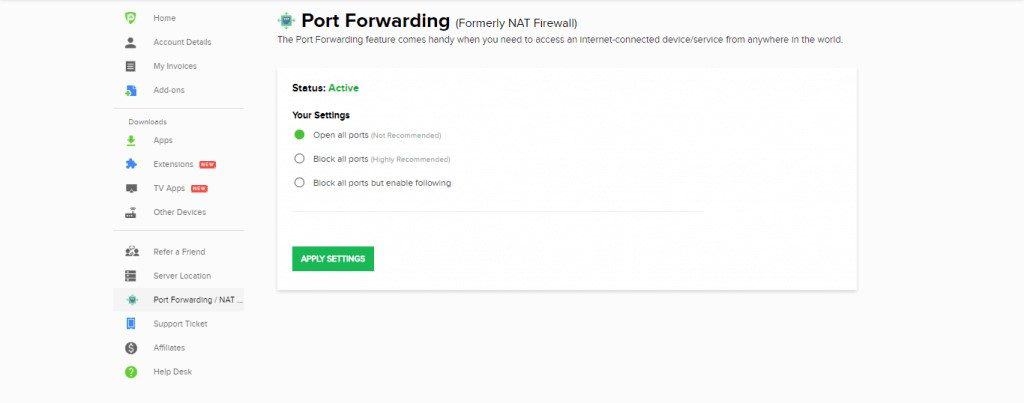
It can be difficult to grasp this complicated information which is why the best way to get around the port forwarding issue on Apex Legends is to use PureVPN’s Port Forwarding add-on.
PureVPN’s Port Forwarding Add-on – Easy & Secured Way to Open All Ports
PureVPN’s Port Forwarding Add-on takes care of your port forwarding concerns. This means you don’t have to stress yourself about manually configuring the UDP/TCP ports.
With PureVPN’s Port Forwarding add-on, you have the ability to forward or open any UDP/TCP ports that seamlessly connects your device with any device or server (Apex Legends in our case), providing you utmost online security from anywhere in the world.
Get Port Forwarding VPN & Open All Ports for any Purpose
Here’s what PureVPN’s Port Forwarding add-on does automatically:
- Opens or forwards any UDP/TCP ports from any device
- Ability to access your PC or laptop from anywhere
- Speed up your P2P downloads
- Use Port Forwarding to configure CGNAT (Carrier Grade Natting)
- Use Port Forwarding to open specific ports for online gaming
- Use Port Forwarding while connected to a VPN
Now that you have gone through the helpful guide, enjoy Apex Legends with the help of PureVPN’s Port Forwarding add-on.

PureVPN

June 20, 2023

3 years ago


