
Table of Contents
To forward ports for Aces High, you will need to go into your router’s settings and add a new port forwarding rule. The rule will need to specify the port(s) that you want to open, as well as the IP address of the computer that will be using those port(s). Once you have saved the new rule, your router will start forwarding traffic to the specified port(s) on the specified computer.
If you haven’t port forwarded a router before, follow our step-by-step guide below.
Requirements to Port Forward Aces High
You need to know the following details to open ports on a router at home or at work:
- The IP address of your device
- The IP address of your router
- TCP and UDP port numbers of Aces High
| Learn More: What is Port Forwarding? |
Step-by-Step Guide to Open Ports for Aces High
- On your web browser address bar, type your router’s IP Address.
- Log in with your router’s credentials to view your router’s settings menu.
- Navigate to the port forwarding section of your router.
- Click on Port Forwarding.
- Enter the IP address of your gaming device in your router in the correct box.
- Put TCP and UDP port numbers for Aces High .
- Click the apply button.
- Restart your router if need be.
Aces High Ports Needed to Run
PC
| TCP: | 2000-7000 |
| UDP: | 2000-7000 |
Quickly and Safely Open Ports on a Router
Now you can port forward multiple ports via PureVPN without technical issues.
What if Your ISP Performs CGNAT?
Most ISPs perform CGNAT (Carrier-Grade NAT) to reduce cost of buying and assigning new IP addresses. CGNAT allows ISPs to assign a single IP address to multiple consumers relying on the same network. Your IP, and other IPs on the same network, are at risk of getting blacklisted if you try to open ports behind CGNAT. Port forwarding is risky behind CGNAT even if your router is configured for port forwarding.
How to Open Ports on a Router Behind CGNAT
The easiest way to port forward routers behind CGNAT is to use PureVPN’s Port Forwarding add-on. You can use an anonymous IP address and port forward routers behind CGNAT with the help of our add-on. Here’s how:
- Login to the PureVPN member area.
- Click the subscription tab.
- Click Configure.
- Apply your desired port settings.
- Click Apply settings.
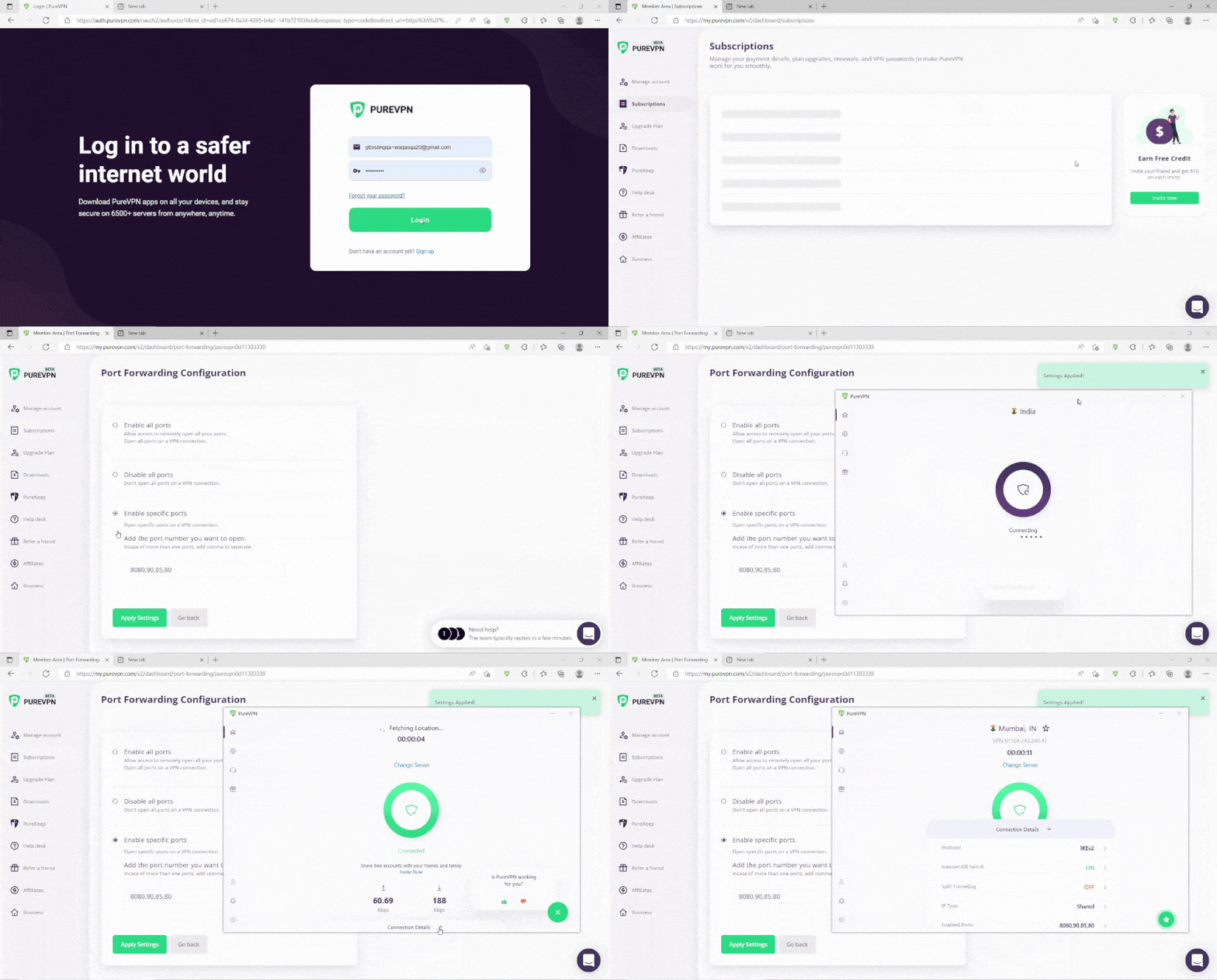
PureVPN’s Port Forwarding Add-on
You can open ports automatically and bypass CGNAT without hassle with a port forwarding add-on. Besides port forwarding, you can use PureVPN to change your IP address, encrypt your internet traffic, and allow you to stay secure on all devices. Here’s what you can do with a PureVPN subscription:
- Access to 6,500 servers in 78+ locations
- Ten simultaneous connections for your entire household
- High-speed VPN connections without data logging
- Robust security and privacy features
Is Port Forwarding Safe?
Port Forwarding is risky. By opening up your router to the internet, you are potentially inviting hackers into your home network. However, if you follow best practices for security measures, such as using a strong password and encrypting your data, you can minimize the risk.
Port forwarding can be used for both legitimate and malicious purposes. For example, port forwarding can be used to allow remote access to a computer on your local network, which can be useful for working from home or accessing files on your home network. However, port forwarding can also be used by hackers to gain access to your network and steal sensitive information.
If you are concerned about the security risks of port forwarding, download and install a VPN.

Ovais Khan

June 20, 2023

3 years ago


